Every Tool You Need for Professional WordPress Development
FeaturesBuild with complete control over every aspect of WordPress development. Visual tools that don't limit your possibilities.
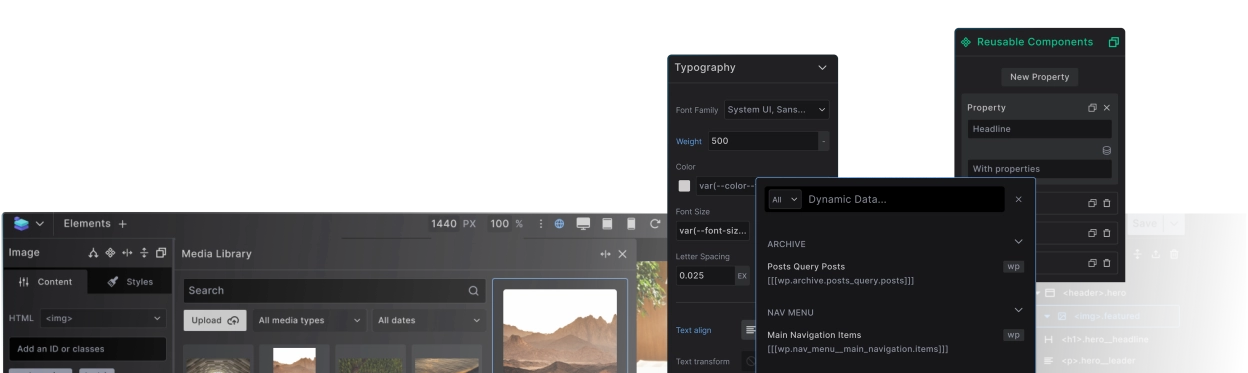
Flexible Site Architecture
Create any website structure with complete HTML control. Design individual pages or assign templates, build reusable components, and connect dynamic data exactly where you need it.
Build Pages & Flexible Templates
Design individual pages directly, or create templates that automatically style hundreds of pages. Set simple or advanced conditions to control which content gets which design — from single posts to entire content types.

Reusable Components
Turn anything from buttons, cards and forms, to headers and footers into reusable components. Edit any component directly where you see it — changes instantly apply to every component instance across your site.

Elements
Complete control over every HTML element. Use any element, any attribute. No black boxes, no hidden structures. Want to integrate a slider library? Recreate its exact HTML structure. Combine any element with dynamic data to create bespoke modern websites. Build whatever you envision.
 Semantic HTML
 Quick Layouts

 Loop anything

 Accessible Menu



 Native Accordions



 Responsive image

 Flexible forms
Dynamic Data & Queries
Advanced data queries made simple. Choose from ready-made query snippets for common needs, then customize which content types and fields you want. See results instantly. For advanced users: full GraphQL editor with autocomplete. Visual query builder coming soon.

Granular Style Control
Master CSS through visual controls that teach real web development skills. Switch between visual interface and code editor, use any selector, and build design systems with variables.
Visual CSS toolkit
CSS controls that teach real web development. Every visual control maps directly to actual CSS properties—no proprietary systems to learn. Your exi sting CSS knowledge works immediately, and skills gained in Builderius transfer to any web project.

CSS Code Mode
One transparent CSS system for visual and code workflows. Switch seamlessly between visual controls and code editor, the same CSS appears both in UI inputs and editable code. No more hunting to find where your styles are coming from.

More than classes, any selector at your fingertips
Beyond basic classes — use any CSS selector you need. Target specific states, combinations, and structures with full selector power. Manage all selectors centrally and scope them precisely to avoid conflicts.

CSS Variables
Make your designs systematic and consistent with the use of Design tokens. Create named values for your design decisions. From colors, and spacing to Typography and layout, create it and save it for reuse. Instead of hardcoding or even remembering your values, just reuse the variables, and update them globally or override locally.

Professional Development Workflows
Professional workflows that no other builder provides. Stage your work safely, manage versions and releases, migrate between sites, and deploy with confidence. Complete development lifecycle control.
Risk-Free Development
Build and experiment safely without affecting your live site. Every change gets saved to a private development environment that only you can see. Test, refine, and perfect your work—then deploy to visitors with confidence.

and live version quickly
Never Lose Your Work
Save your milestones as named releases while you build. Each release captures your current state with descriptions and version numbers. Made a mistake or need to go back? Instantly revert to any previous release. Professional backup and recovery built into your workflow.

Move Your Builderius Work Between Sites
Export your Builderius work to other websites. Move designs from local to live server, or reuse templates and components across projects. Only visual development transfers — content stays intact.

migration and distribution readyMove designs between websites
Experiment with Multiple Versions
Try different design approaches safely. Create "Version A" and "Version B" from the same starting point, compare them side by side, then go live with your favorite. Perfect for client presentations or testing ideas.

Compare all the features
Current & Planned FeaturesAvailable Now
| Features | Community | Website | Professional | Studio |
|---|---|---|---|---|
| Releases & Version Tracking | ||||
| ReleasesCreate and manage releases | Yes | Yes | Yes | Yes |
| Built in stagingDevelopment and production branches | Yes | Yes | Yes | Yes |
| Import/Export ReleasesExport a release as a zip, import it on another site | Yes | Yes | Yes | Yes |
| Preview Development/Production VersionEasy toggle to see different branches | Yes | Yes | Yes | Yes |
| History, undo and commitsUndo and redo every change, save commits and revert to earlier states | Yes | Yes | Yes | Yes |
| Preview asEasy toggle to view as another user, logged out ... etc. | No | Yes | Yes | Yes |
| Templating | ||||
| Regular TemplateFull page templates | Yes | Yes | Yes | Yes |
| Template locationsAssign templates using template locations | YesDefault post and pages only | Yes | Yes | Yes |
| Template conditionsAssign templates to advanced conditions | No | Yes | Yes | Yes |
| Individual Pages & PostsDesign directly using Builderius | Yes | Yes | Yes | Yes |
| Individual Custom Posts (CPT)Design directly using Builderius | No | Yes | Yes | Yes |
| Starter siteComplete site design to start from | Yes | Yes | Yes | Yes |
| Global Components | ||||
| Built in componentsSite Header and Site Footer | Yes | Yes | Yes | Yes |
| Custom componentsCreate and configure unlimited components, with editable properties | No | Yes | Yes | Yes |
| Dynamic Data | ||||
| WordPress fieldsDefault fields provided by core WordPress | Yes | Yes | Yes | Yes |
| Custom post types & taxonomiesUse CPTs, custom taxonomies and their data | No | Yes | Yes | Yes |
| Custom fieldsGeneric (meta fields), ACF & Meta Box, including repeaters and advanced fields | YesSimple fields, no repeaters... | Yes | Yes | Yes |
| Built-In LoopsNon configurable, post loops and WP menu loops | Yes | Yes | Yes | Yes |
| Advanced LoopsConfigurable queries for posts, terms, users, repeaters... | No | Yes | Yes | Yes |
| Dynamic Data GraphQL IDEGraphQL code editor, editable GraphQL code snippets... | No | Yes | Yes | Yes |
| Conditions builderShow/hide elements based on various conditions | YesLimited settings | Yes | Yes | Yes |
| Scope the Dynamic Data RequestsAssign dynamic data to global, template or component scope | No | Yes | Yes | Yes |
| Builderius ExpressionsUse expressions for powerful data output modification | No | Yes | Yes | Yes |
| Styling | ||||
| Graphical Interface for StylingUse advanced graphical tools to style any item | Yes | Yes | Yes | Yes |
| Full CSS code IDEAll styling can be accessed using GUI and/or code editor | No | Yes | Yes | Yes |
| Built in CSS FrameworkUse, modify or delete parts of Builderius CSS framework | Yes | Yes | Yes | Yes |
| Assign CSS to ScopeLoad only when said CSS is used, manage CSS overrides | No | Yes | Yes | Yes |
| Selectors and CSS Variable ManagerCentralised panels, for management of selectors and variables | YesGlobal scope only | Yes | Yes | Yes |
| Built in Global BreakpointsUse and configure 3 built in breakpoints across the site | Yes | Yes | Yes | Yes |
| CSS GridBuild grid layouts using GUI controls | No | Yes | Yes | Yes |
| Font managerAdd Google Fonts or local fonts, configure family, weights, styles and loading | No | Yes | Yes | Yes |
| Page Structure, HTML and Elements | ||||
| Fundamental Builderius ElementsElement for most layouts | Yes | Yes | Yes | Yes |
| Any HTML TagAccess any html tag, or create custom html elements | NoLimited to most common | Yes | Yes | Yes |
| HTML Attributes100% access to each html element’s attributes, static or dynamic | Yes | Yes | Yes | Yes |
| HTML, CSS & JS importerTurn an HTML page into a WordPress page, with CSS and JS extracted into separate files | No | No | Yes | Yes |
| JSON importerPaste Builderius JSON from another template or site | No | No | Yes | Yes |
| Design LibrarySections, widgets and wireframes on library.builderius.io | Yes | Yes | Yes | Yes |
| Scripts and Assets | ||||
| Script managerEnqueue JS and CSS libraries like GSAP or Swiper, enable or disable WP scripts, with scoping and localization | No | Yes | Yes | Yes |
| JavaScriptWrite JS, set it to defer or async, in header or footer | No | Yes | Yes | Yes |
| Multilingual tools | ||||
| Language based conditionsShow/hide elements, assign templates — per language | No | Yes | Yes | Yes |
| String translationsCreate multilingual templates, components and pages | No | Yes | Yes | Yes |
| Platform tools | ||||
| Static site generationBuild a static site from a release, deploy to FTP, GitHub Pages or Cloudflare Pages | No | No | No | Yes |
| One-click deploy to remote WordPressPush a release to a live WordPress site in one click | No | No | No | Yes |
| Sense AIAgentic building with full builder awareness and live editing, across the whole site | No | No | No | Yes |
Planned Features
| Features | Community | Website | Professional | Studio |
|---|---|---|---|---|
| Releases & Version Tracking | ||||
| Custom BranchesCreate additional branches to aid development process | No | No | Yes | Yes |
| Templating | ||||
| WooCommerce supportTemplates and dynamic data for WooCommerce stores | No | Yes | Yes | Yes |
| Dynamic Data | ||||
| Dynamic Data Visual IDEConfigure GraphQL queries visually | No | Yes | Yes | Yes |
| In ProgressJetEngine integrationCustom post types, taxonomies, fields, relationships, GraphQL and Sense AI data models | No | Yes | Yes | Yes |
| Styling | ||||
| In ProgressCSS Grid BuilderCreate stunning layouts, using visual grid builder | NoText input only | Yes | Yes | Yes |
| Advanced BreakpointsCustom @media, local, template, global breakpoints | No | Yes | Yes | Yes |
| Container QueriesSet responsive design based on containers instead of screen size | No | Yes | Yes | Yes |
| Custom CSSWrite or use custom CSS code in isolated code editor | No | Yes | Yes | Yes |
| Page Structure, HTML and Elements | ||||
| Advanced Builderius ElementsLeverage the interactive, dynamic and composite elements | No | Yes | Yes | Yes |
| Custom ElementsCreate any element, add it to inserter, import/export ... | No | No | Yes | Yes |
| Platform tools | ||||
| Dynamic Data StudioAny data source, various formats, local or remote, code or UI... | No | No | No | Yes |
| Gutenberg integrationUse Builderius templates and components in the block editor | No | No | No | Yes |
| Access to MarketplaceSell section designs, and complete site solutions | No | No | No | Yes |
| CollaborationStreamline workflows for teams, asynchronous development | No | No | No | Yes |
| Client modeSimplify and streamline the builder for content editing first | No | No | No | Yes |
| Featured listingGet your agency and your work listed on our website | No | No | No | Yes |
Ready to build like a professional?
Transform your WordPress workflow with professional-grade visual development. No more compromising between speed and quality.