We gave a Builderius user our main website to build while the product was still in beta. Here's what happened.
Article
You’re reading this on a site built entirely by someone who doesn’t work here.
Every page, every template, every menu interaction, every responsive behavior, built in Builderius, by an independent developer named Israel Reyes, working from a Figma file and a beta version of our Pro builder that was, at times, barely holding together.
This wasn’t a demo project. It wasn’t a controlled environment with engineers on standby. Reyes built a production website with real deadlines using a tool that was still being actively developed, and he documented bugs along the way while doing it.
The site went live in late November 2025 with our components release. Since then it’s been running in production, handling traffic, doing its job. We wanted to let it settle before telling this story.
Why would we do this? Partly because we needed a website. Partly because we wanted to know if Builderius could survive a full, real project in the hands of someone who wasn’t us. Isn’t that a weird idea? Hand over your company’s main website to a product user, an advanced one, sure, but still. We liked it immediately.
What happened was this article.
Who is Israel Reyes
Reyes has been building WordPress sites since before page builders existed, which meant building themes from scratch.
I fell in love with WordPress and started creating themes. Then the first page builders appeared. I was never a fan of Elementor, but rather of builders that gave me more control. I discovered Oxygen Builder, one of the best builders of its time, then the game changed with Bricks, which offered much greater control. I created sites that Oxygen and Bricks themselves have showcased as featured projects. Although for privacy and out of respect for my clients I can’t mention them, even as a “ghost,” I’m proud of that.
Reyes showed up in the Builderius community around early 2025 and quickly made an impression.
Elvis, Builderius designer: What stood out to me was his skill. His pages and sections are really well made, and he has a particularly good eye for aesthetics. That mattered to me as a designer. The new website was part of an overall rebranding into a coherent visual language where balance and quality play an important part. We needed someone knowledgeable, we needed a quality site, and it had to not be one of us. Reyes said yes. And so it began.
The experiment
In September 2025, Reyes began working on builderius.io with a very early beta of the Pro builder. “Very early” is generous, by his own account, it was closer to an alpha.
My biggest concern was that Builderius was still very new. Even though I had already tested it, the truth is I wasn’t an expert with it yet, so building a site for a builder was definitely a challenge.
And then there was the language barrier.
My English is so bad that, if it were JavaScript, it would return
undefined.
That was actually a real concern on both sides. Reyes worried about communicating with the team. Elvis worried that the detailed Figma annotations, semantic HTML requirements, accessibility specs, component states, might get lost in translation.
It turned out not to be an issue at all. The design file did most of the talking.
Elvis, or whoever the designer was, is really good at both designing and explaining. They delivered a very organized and detailed Figma project, even including technical parts and accessibility improvements. They were very specific with the components, their states, and even the states of elements like inputs and buttons. I rarely receive a project that is so well defined, and honestly, I had very few questions.
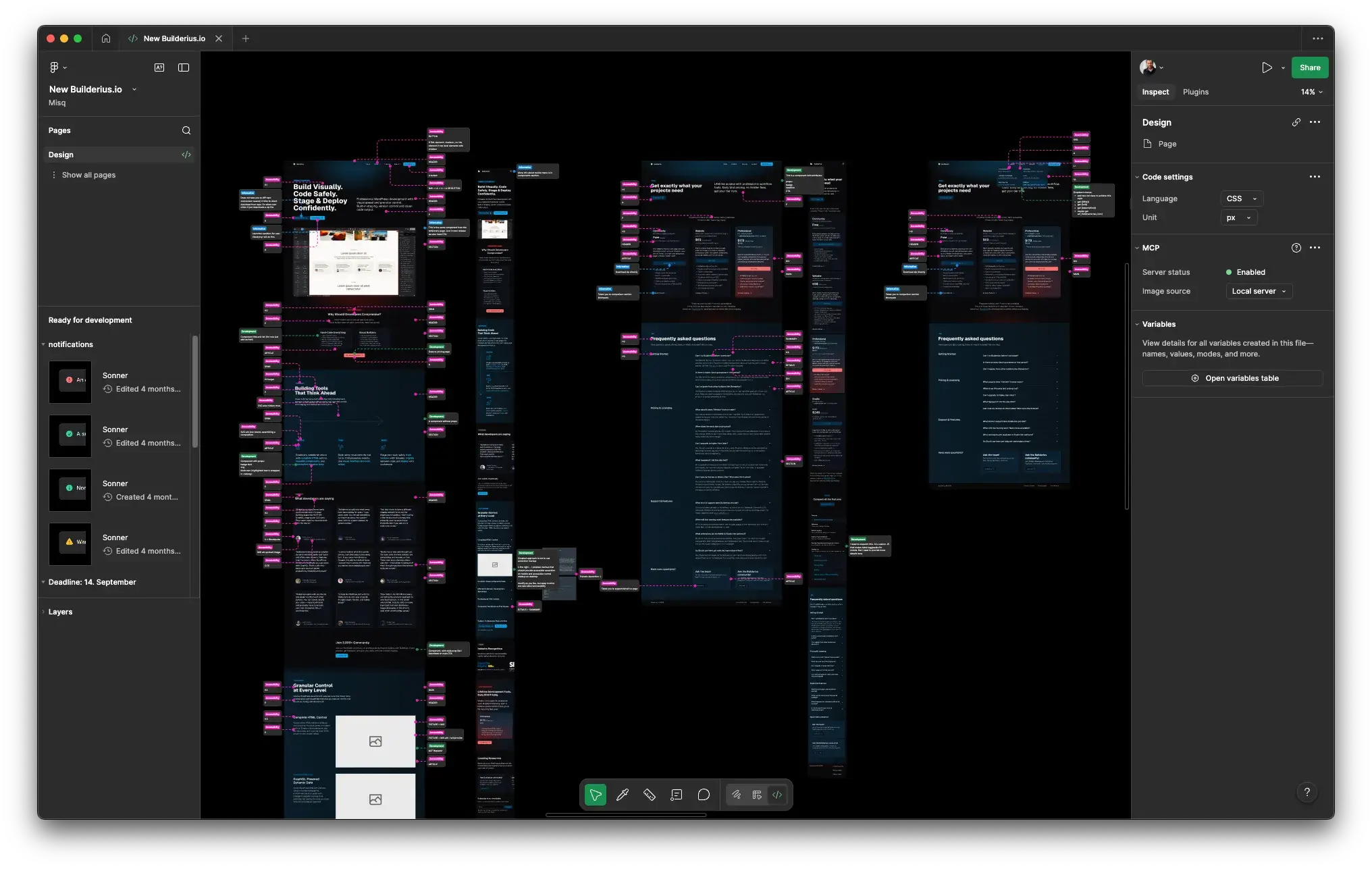
Elvis: With my experience designing for developers (I also develop sometimes), I’ve learned the value of being precise. It helps me understand my own design, what I want it to be and act like, and it helps the developer understand my intentions. I structure the design with components, auto-layouts, variables, to try and show how I think it should be built in code. Then I add annotations to any aspect of design that doesn’t seem obvious. In this case, since I was also responsible for the copy, the design had all the proper text and assets, no lorem ipsum, the real deal.
The first version of the site was built in about three weeks, enough for a release deadline. The second and final version took about a month. Between those two phases, Builderius received a stream of updates, bugs had to be fixed, and sometimes Reyes had to wait for the team to resolve things before he could continue.
Elvis: He was patient with his double role, a developer and a debugger. Documenting the bugs he encountered. Both super valuable for us.
The wake-up call
This is the part of the story that makes the whole thing worth telling.
Reyes has spent years building with tools like Oxygen, Bricks, and Elementor. Professional-grade work. Hundreds of sites. But those builders, by design, abstract away the HTML. You add text, it generates a <div>. You create a card, it’s another <div>. You stop thinking about semantic elements because the tool doesn’t ask you to.
As a developer, I had forgotten the technical side. I’m not a lawyer or a doctor; this is my profession.
When Elvis reviewed Reyes’s first implementation of the site, the visual work was excellent. But the HTML told a different story, excessive ARIA attributes, <div> elements where there were clear semantic candidates.
Elvis told me, “Visually it’s very nice, but you have a lot of bad practices.” It felt like a bucket of cold water.
Elvis: I guess Reyes understood it a bit more harshly than was my intention. Maybe it’s also a language thing, none of us is an English native, but with different mother tongues. One of the requirements for the development was semantic HTML and an accessible site. I gave him pretty precise annotations about how the site should be structured. And in a large majority of cases he did this very well. But once I looked at the HTML, there were some excessive ARIA attributes, and some elements where there were clear semantic candidates that used divs instead. Nothing terrible. I pointed out the issues and he fixed them quickly. To me that was normal, my comment was entirely utilitarian. I saw things I wanted fixed, so I said what they are. And yes, visually it all looked very good from the start. That is definitely his strong suit.
What makes this moment important isn’t the feedback itself. It’s what it reveals about the tools developers use every day. Builderius doesn’t let you forget what you’re building. There’s no abstraction layer politely hiding your <div> soup. Every element, every tag, every attribute is visible and intentional, because the builder assumes you’re a developer who cares about these things.
For Reyes, it was a reset.
What started as a concern with Builderius ended up becoming a lesson that I can now say with confidence: it won’t happen to me again.
How it actually got built
Working on a live site without breaking It
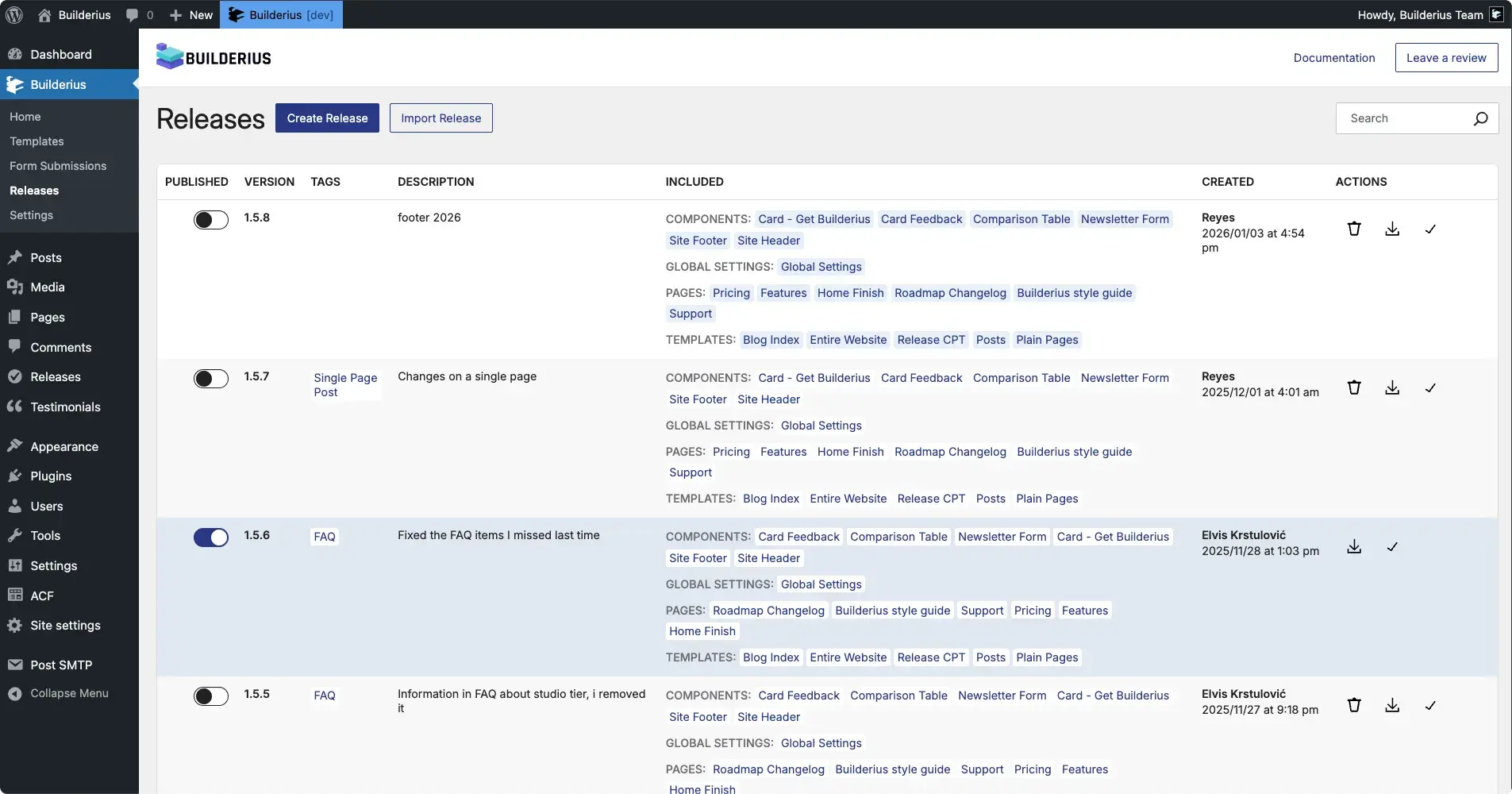
The staging and release system was, by Reyes’s account, one of the hardest things to get used to, and one of the most valuable once he did.
The concept: Reyes worked on a staging branch of the live site. Users visiting builderius.io never saw the work in progress, the broken layouts, the beta-induced chaos. When a version was ready, it could be published as a release, instantly, no downtime, no migration.
Most people only saw the first published page, but in reality, throughout the process the site went through countless changes. There were errors, remember, it’s still in beta. Everything would get messy, break, fall apart… it was chaos. And this is exactly where Staging became incredibly helpful. I could run as many tests as I wanted, and the final user never saw that disaster.
Honestly, at first it was a bit hard for me to understand this part. I wasn’t used to using a tool like this. But later I realized it’s one of the best features Builderius has. I dare say it’s truly powerful.
He immediately saw the application for his WooCommerce work:
With other builders I have to create a copy of the site on my server, make the changes there, and when I’m sure everything is fine, I start migrating those changes one by one to the live server, but only during off-hours, like at midnight, to prevent the site from going into maintenance mode for an hour and causing real losses for the client. With Builderius, I can work as much as I want without affecting the production site. When everything is ready, I simply publish the final release with one click, no interruptions, no risks, and no sacrificing my nights.
He even came up with a use case the team hadn’t considered:
You can create a countdown that says “this site will be updated in a few hours with a Christmas version.” When the countdown ends, you publish the new release and the entire site looks festive. And when the season ends, you switch back to a previous release with a single click.
Elvis: It took a while for Reyes to relax and get into using the built-in staging and developing on a live site. And to agree on the process. He did once publish a design before we verified it. So we agreed: he never publishes into a production branch, that’s something only we do. After that, smooth sailing. I also did some damage a couple of times when I didn’t check if he’d been working on the site before I started making changes, which meant I destroyed some work he’d done. That’s a limitation I noticed, Builderius doesn’t yet have great tools for team coordination. I would have loved to have annotations inside the builder instead of screenshotting and annotating externally. Those are things on our list.
Queries, templates, and code access
Reyes worked with GraphQL for dynamic data, something most WordPress builders don’t offer.
At first, it really took me a bit to understand how to correctly build queries with GraphQL. But that’s exactly where the good part is: as a developer, you enjoy it when something challenges you. Once you understand it, you realize it wasn’t that complicated, and it gives you far more control. Almost no builder offers anything like this. You can request exactly the data you need without loading anything unnecessary, and you can run all kinds of queries: menus, categories, users, content types… everything nicely organized and without weird hacks.
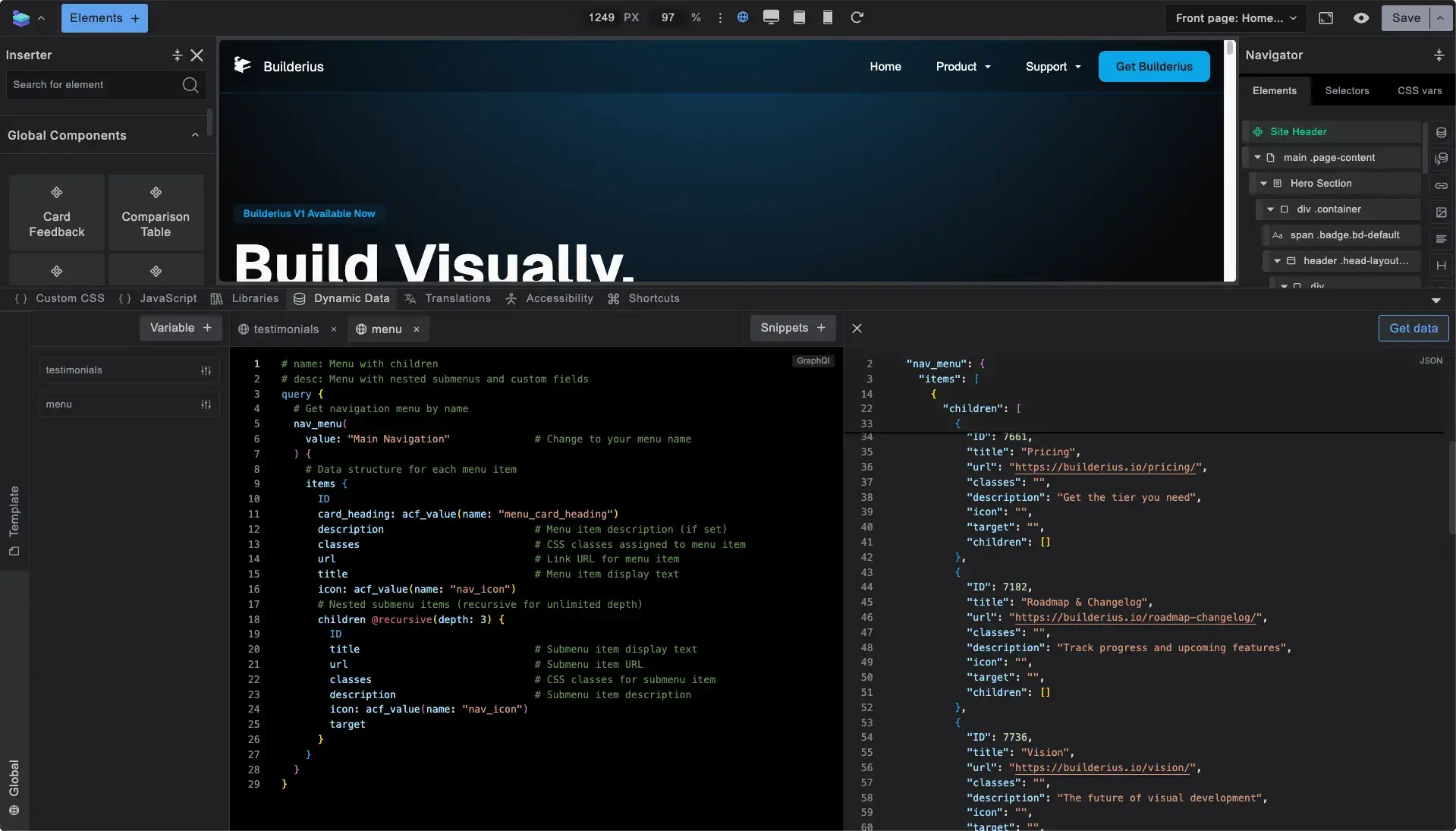
The templating system, the direct CSS and HTML access, the way attributes are surfaced, Reyes keeps coming back to the same point from different angles: everything is right there, not buried in “advanced” panels.
Direct access to CSS and HTML completely changed the way I work. Many builders claim to give you that level of control, but the truth is they don’t. When you develop a site professionally, you use a lot of attributes, and in most builders those settings are hidden inside “advanced” sections. Builderius places them right from the start, exactly where you need them.
Elvis: Reyes built some technically interesting things for the site. For example, I asked him to create ACF custom fields inside the menu so I could add SVG icons and descriptions to menu items, control whether submenus display as one or two columns, and create top-level submenu items as buttons instead of the default link-plus-toggle pattern. I had a pretty precise idea of how I wanted to manage the menu, and he had no issues implementing it.
The honest take
Here’s where it matters that Reyes is a fan of the competition.
This is a tough question, because honestly, I’m a fan of Bricks and Oxygen. And Elementor is perfect for people who don’t want to touch code, that’s a whole different topic. But if I had to mention something that truly makes a difference: if you’re a professional web developer and this is your work, I would choose Builderius.
He’s not dismissing other tools. He built hundreds of sites with them and will likely continue using them where they fit. The distinction he makes is specific:
Builderius feels like a tool made specifically for developers. It gives you much more direct control over the DOM and lets you access things quickly that, in other builders, are slow or hidden. Changing a tag or adding an attribute: in most builders you need to open extra panels because it’s considered an “advanced feature”; in Builderius, everything is right there, always visible, because it’s designed for people who actually develop. Its main strength is that it respects a developer’s workflow and stays out of your way.
And what’s not ready yet? He doesn’t soften it:
Not having something like Ctrl+Z makes the workflow more complicated. A right-click menu for quick actions inside the canvas would be very useful; sometimes, when a project has a lot of branches, it’s hard to find the correct element. The alphabetical order of classes and variables is chaotic. I’m a web developer, not a Spanish teacher, so that kind of ordering doesn’t make practical sense to me.
These are real workflow friction points. They exist because Builderius is still in active development, the same beta that Reyes was building on while reporting bugs. The team knows about them.
But here’s the thing that matters most: despite those limitations, despite the beta instability, despite the chaos of building a production site on a tool that was being updated underneath him,
Yes, I’m using it right now for client projects. Even though it’s still in beta, I trust that it’s a builder with a lot of potential, and that’s why I decided to use it even on live sites for real clients.
Nowadays we see so many repetitive websites that it sometimes feels like everything has become stagnant, and that leads many people to think that if you want a professional site, you shouldn’t use WordPress. But maybe the problem isn’t WordPress, maybe it’s the builder you’re using.
What’s next
Reyes is starting his own web agency. A first, after years of ghost-developing for other agencies. Builderius will be his main builder.
If I can create affordable sites that still have a genuinely professional level, that will be my goal in this new stage.
The site you’re reading this on is his proof of concept. A real website, built on a beta, with real bugs, real deadlines, and a designer with very specific opinions.
It works. Scroll around. That’s the whole argument.
Get in touch with Reyes

Ready to build like a professional?
Transform your WordPress workflow with professional-grade visual development. No more compromising between speed and quality.